Speaker and headset profiles
Choose one output for desktop use and another for games, calls, or focused work.
Windows 10/11 · x64 · Free utility
Automatically move between speakers and a headset when selected games or programs start. Choose instant switching, a confirmation prompt, or a manual hotkey.
Self-contained ZIP · No Python installation · Runs without administrator privileges
One clear control center
The settings window keeps audio profiles and program behavior together, while the compact mini view stays out of the way.
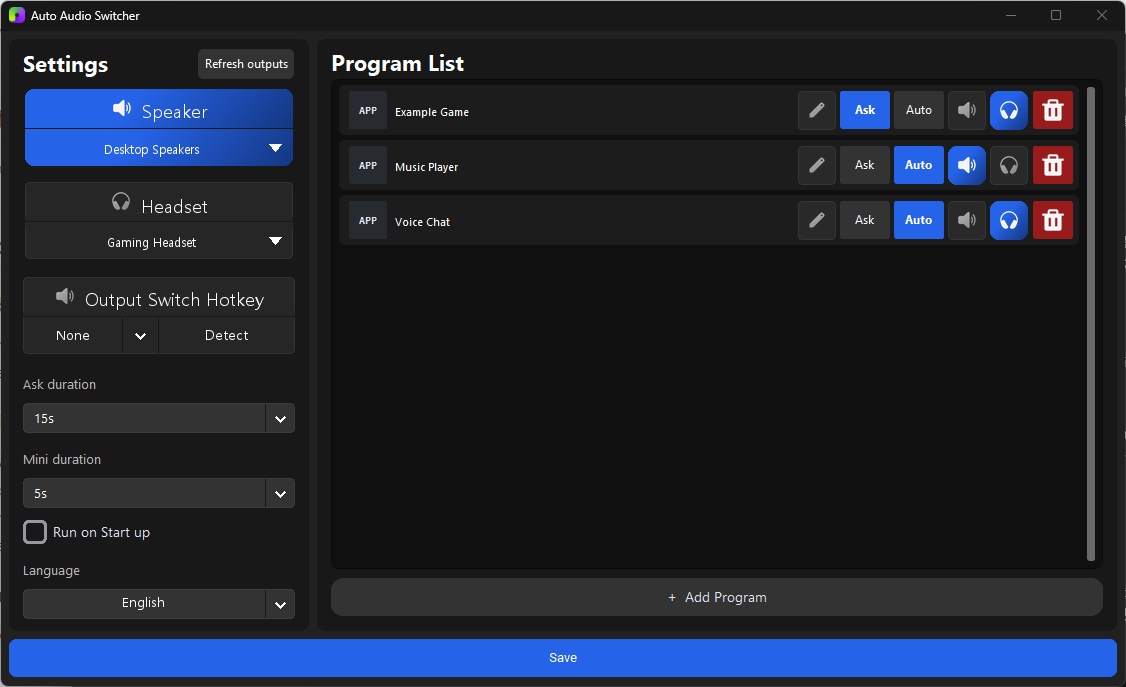
Built for everyday Windows audio
Choose one output for desktop use and another for games, calls, or focused work.
Add running programs or EXE files and decide which output each program should use.
Switch immediately or show a short confirmation before changing the default device.
Toggle between configured outputs without opening Windows sound settings.
Keep your chosen output profile even when that device is temporarily unavailable.
Settings scale to fit different Windows display sizes and DPI configurations.
Ready in minutes
Select your speaker and headset devices.
Pick a running app or browse to its EXE file.
Let the app handle the next output change.

한국어 지원
게임이나 지정한 프로그램이 실행되면 스피커에서 헤드셋으로 자동 전환하고, 프로그램이 종료되면 다시 원하는 출력으로 돌아갈 수 있습니다. 자동 변경이 부담스럽다면 확인창을 표시하거나 출력 전환 단축키를 사용할 수 있습니다.
Private by design
Auto Audio Switcher has no telemetry and does not upload runtime information. Settings, cached icons, and bounded diagnostic logs remain under your local Windows user profile.
Common questions
No. The Windows release ZIP includes Python and all required runtime libraries.
Yes. Add a program rule, choose its target output, then select Ask or Auto behavior.
No. The app runs with standard user privileges and stores its writable data in the current user's local app data folder.
The current direct-download executable is not Authenticode-signed. Verify that the download comes from the official GitHub release page and compare the published SHA-256 value.
Version 1.1.0
Download the self-contained Windows x64 release and choose how each program should sound.